Measure Anything, Measure Everything

Posted by Ian Malpass | Filed under data, engineering, infrastructure

If Engineering at Etsy has a religion, it’s the Church of Graphs. If it moves, we track it. Sometimes we’ll draw a graph of something that isn’t moving yet, just in case it decides to make a run for it. In general, we tend to measure at three levels: network, machine, and application. (You can read more about our graphs in Mike’s Tracking Every Release post.)

Application metrics are usually the hardest, yet most important, of the three. They’re very specific to your business, and they change as your applications change (and Etsy changes a lot). Instead of trying to plan out everything we wanted to measure and putting it in a classical configuration management system, we decided to make it ridiculously simple for any engineer to get anything they can count or time into a graph with almost no effort. (And, because we can push code anytime, anywhere, it’s easy to deploy the code too, so we can go from “how often does X happen?” to a graph of X happening in about half an hour, if we want to.)

Meet StatsD

StatsD is a simple NodeJS daemon (and by “simple” I really mean simple — NodeJS makes event-based systems like this ridiculously easy to write) that listens for messages on a UDP port. (See Flickr’s “Counting & Timing” for a previous description and implementation of this idea, and check out the open-sourced code on github to see our version.) It parses the messages, extracts metrics data, and periodically flushes the data to graphite.

We like graphite for a number of reasons: it’s very easy to use, and has very powerful graphing and data manipulation capabilities. We can combine data from StatsD with data from our other metrics-gathering systems. Most importantly for StatsD, you can create new metrics in graphite just by sending it data for that metric. That means there’s no management overhead for engineers to start tracking something new: simply tell StatsD you want to track “grue.dinners” and it’ll automagically appear in graphite. (By the way, because we flush data to graphite every 10 seconds, our StatsD metrics are near-realtime.)

Not only is it super easy to start capturing the rate or speed of something, but it’s very easy to view, share, and brag about them.

Why UDP?

So, why do we use UDP to send data to StatsD? Well, it’s fast — you don’t want to slow your application down in order to track its performance — but also sending a UDP packet is fire-and-forget. Either StatsD gets the data, or it doesn’t. The application doesn’t care if StatsD is up, down, or on fire; it simply trusts that things will work. If they don’t, our stats go a bit wonky, but the site stays up. Because we also worship at the Church of Uptime, this is quite alright. (The Church of Graphs makes sure we graph UDP packet receipt failures though, which the kernel usefully provides.)

Measure Anything

Here’s how we do it using our PHP StatsD library:

StatsD::increment("grue.dinners");

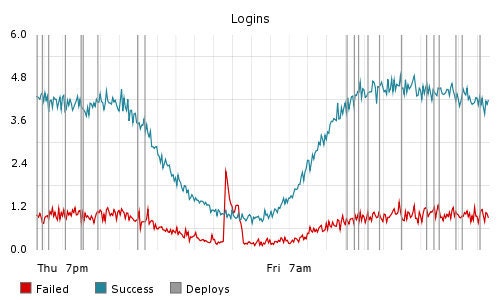
That’s it. That line of code will create a new counter on the fly and increment it every time it’s executed. You can then go look at your graph and bask in the awesomeness, or for that matter, spot someone up to no good in the middle of the night:

Graph showing login successes and login failures over time

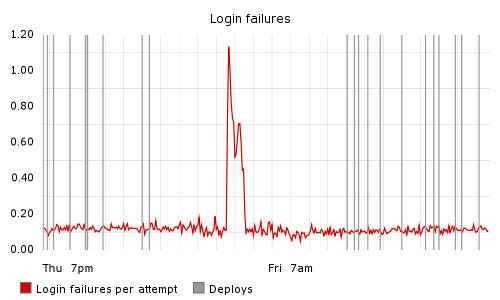
We can use graphite’s data-processing tools to take the the data above and make a graph that highlights deviations from the norm:

Graph showing login failures per attempt over time

(We sometimes use the “rawData=true” option in graphite to get a stream of numbers that can feed into automatic monitoring systems. Graphs like this are very “monitorable.”)

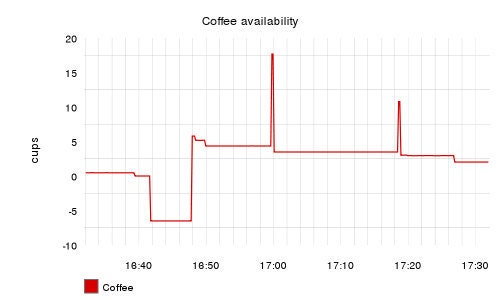
We don’t just track trivial things like how many people are signing into the site — we also track really important stuff, like how much coffee is left in the kitchen:

Graph showing coffee availability over time

Time Anything Too

In addition to plain counters, we can track times too:

$start = microtime(true);
eat_adventurer();
StatsD::timing("grue.dinners", (microtime(true) - $start) * 1000);

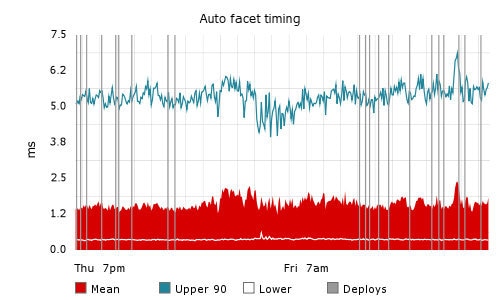
StatsD automatically tracks the count, mean, maximum, minimum, and 90th percentile times (which is a good measure of “normal” maximum values, ignoring outliers). Here, we’re measuring the execution times of part of our search infrastructure:

Graph showing upper 90th percentile, mean, and lowest execution time for auto-faceting over time

Sampling Your Data

One thing we found early on is that if we want to track something that happens really, really frequently, we can start to overwhelm StatsD with UDP packets. To cope with that, we added the option to sample data, i.e. to only send packets a certain percentage of the time. For very frequent events, this still gives you a statistically accurate view of activity.

To record only one in ten events:

StatsD::increment(“adventurer.heartbeat”, 0.1);

What’s important here is that the packet sent to StatsD includes the sample rate, and so StatsD then multiplies the numbers to give an estimate of a 100% sample rate before it sends the data on to graphite. This means we can adjust the sample rate at will without having to deal with rescaling the y-axis of the resulting graph.

Measure Everything

We’ve found that tracking everything is key to moving fast, but the only way to do it is to make tracking anything easy. Using StatsD, we enable engineers to track what they need to track, at the drop of a hat, without requiring time-sucking configuration changes or complicated processes.

Try StatsD for yourself: grab the open-sourced code from github and start measuring. We’d love to hear what you think of it.


116 responses to Measure Anything, Measure Everything

  • Julien says:

    BRilliant! We use a similar approach with collectd and try to track anything relevant! the funny thing is that something can only be relevant for a specific release, so we track, and then forget!

  • Manas says:

    Why not have the traditional SNMP traps?

  • Ian Malpass says:

    JULIEN: Well, the good news is that these UDP pings are so lightweight that it’s generally not a problem to keep them around for a while, and it’s surprising how often you find that “just for this release” metrics turn out to have interesting information in them weeks later. But yes, it’s good to clean house every so often.

    MANAS: Those would have worked, I’m sure. I think there are lots of ways to solve this particular problem. As long as a given solution has next to no management overhead, and is trivially easy for engineers to use, you’ve got something useful.

  • Daniel says:

    I’m not familiar with the concept of negative coffee. Also, I see you guys sit around the coffee pot at 17:00 just waiting for the fresh pot to finish brewing, and then immediately chug away ;)

  • Eric says:

    Will you be releasing the StatsD PHP client library?

  • Ian Malpass says:

    Eric: Yep, it’s already in with the statsd code on github – https://github.com/etsy/statsd/blob/master/php-example.php

  • Ian Malpass says:

    Daniel: I see you’ve spotted that our coffee monitoring system doesn’t cope well with people leaving the pot off the scale, demonstrating the importance of tracking metrics in software development ;)

  • Steve Ivy says:

    Ian, this is great stuff. I’ve already got a project his is going to get stood up for. I ported the PHP sample to Python, since that’s my environment. You can find it on my statsd fork:

    https://github.com/sivy/statsd/blob/master/python_example.py

    (I sent a pull request just in case you guys find it useful)

    Thanks again for sharing your tools!

  • Steve Ivy says:

    A stand-alone Python Statsd client is now at:

    https://github.com/sivy/py-statsd

    Cheers!

  • [...] stumbled across this recent posting by one of the etsy.com engineers. I am “like WOW!”. I am jumping on the web 3.0 [...]

  • efkastner says:

    Steve: I applied your patches, good stuff :)

    Someone needs to make a ruby gem or example client library for us to include!

  • Steve Ivy says:

    Erik,

    Thanks! I noticed that a bit earlier.

    I also managed to get the standalone client into pypi tonight (http://pypi.python.org/pypi/pystatsd/), and got it to install via pip on my server. Now to get cairo, pixman, and pycairo working… *grumble*.

  • Tom Taylor says:

    I wrote a little Ruby client (basically a port of the Python example), over here:

    https://github.com/tomtaylor/statsd-client

  • Tim Spence says:

    Ian,
    I get that the fire-and-forget power of UDP allows your apps to track anything/everything without compromising responsiveness. I have a question about the Why behind StatsD. Before you wrote StatsD, did you find that you were saturating Graphite’s agent (carbon-agent), or was this more of a preemptive strike? I’m curious about carbon-agent’s capacity under variable load.

    Great blog, btw–it’s inspiring to see a whole crew of developers so proud of the tools they build!

  • [...] Measure Anything, Measure Everything seems pretty cool. Suspect you could do something in your scripts to ping the counter so you could get visualizations of your runs. [...]

  • Steve Ivy says:

    As I mentioned to Erik (Kastner) the other day, it would be cool if there was a wiki or other public repository of stats/graphite recipes. I know how to shove data into graphite with statsd, but I don’t feel like I have a good grasp of how to best tease out the interesting graphs.

  • Mark Bainter says:

    Tim – I think the issue is in your first sentence. To do what they’re doing with carbon directly you’d have to have the additional overhead of building a tcp connection.

    If carbon had the ability to receive data via UDP messages like this I think it would be fine in terms of load. But this code also abstracts some of the the work. As simple as it is to get data into graphite, this lets you easily add certain kinds of graphs without the developers using it having to know much about how it works.

    It also lets you force them into a given hierarchy – so they can’t clutter the root with tons of new graph paths, which is a nice touch as well.

  • Ian Malpass says:

    Tim – Mark’s point is a good one, but really, the key feature of StatsD is that it aggregates metrics into time buckets (10 seconds in our case). When you send data to graphite, you say “store value N for metric M at time T”. If you have multiple, separate M events happening at time T, you need a central aggregator to sum these and then send a single value to graphite. This central aggregation also allows us to do the statistical work for the timing functions – high/low/mean/90th-percentile.

  • [...] simple performance metrics without a lot of centralized processing. I could use something like StatsD from the Etsy folks but got inspired by reading about Redis at Disqus the other [...]

  • Steve Ivy says:

    Aaaand, once more client – in node.js this time:

    https://github.com/sivy/node-statsd

  • Steve Ivy says:

    Joshue Frederick (jfred on gihub) contributed a python implementation of the statsd server. I don’t know how it compares to the node version for speed (it’s not async) but it’s pretty cool to have another implementation of the server.

  • [...] This blog post by the etsy engineering team about tracking everything made me drool http://codeascraft.etsy.com/2011/02/15/measure-anything-measure-everything/ [...]

  • Phillip Winn says:

    We implemented this in my office, and found frequent 5 second delays (or delays in increments of 5 seconds, since we have multiple statsd calls per transaction). We had to turn it off.

    We don’t seem to see as many (or any) delays when the (PHP) client and server are on the same host, but as soon as they’re separated by a network, the delays are awful.

    Since Etsy is clearly using more than one server (ha!), presumably you either deal with this problem, or have worked around it, or, I suppose, have a better network than we do. There doesn’t seem to be any way to “fire and forget” an async StatsD::increment, for example.

    Any thoughts from either Etsy or other PHP users?

  • Adam says:

    How are you guys doing the coffee graph? I can’t seem to find any documentation in graphite about actual counting on the graphs. Nothing in the statsD library makes me thing I can control that either.

  • And, I’ve added a java client–https://github.com/apgwoz/statsd/blob/master/StatsdClient.java

  • Wil Tan says:

    We just created an erlang implementation. It’s only been rudimentary tested against Joshua’s / Steve’s pystatd.server.

    https://github.com/wil/erlstatsd

  • Since you want to ignore outliers, why are you using the mean rather than the median?

  • Phillip: is it a DNS resolution problem? To achieve true “fire and forget”, you probably need to configure the client to send to an IP address rather than a host name.

  • Kris Gösser says:

    Does this work with any database configuration, or do you recommend only using the Round Robin Database tool suggested in the Flickr post?

    As I start to investigate, this is my main question. MySQL, Postgres or Mongo, whatever, just curious if it’s open to use whatever we’d like.

  • Ian Malpass says:

    Donnie: We only wanted to ignore outliers in the “upper bound” metric, just to avoid the worst spikes. We could (probably should) add calculating the median to the StatsD timing code too.

    Kris: Graphite uses a round-robin database to store its data, and we send the data to Graphite. The *idea* of StatsD (a central aggregator, sending data on to a storage system) could be applied to any backend storage system, if Graphite doesn’t suit you.

  • Ian Malpass says:

    Adam: We cheat, and use the timers to send the number of grams on the USB scale as a “time”, and then graph the mean along with Graphite’s keepLastValue() function, and a its scale() function to convert the grams to cups.

  • Ian: Here’s something you might consider, based on a common technique in statistics called a box plot. They plot the median, 25% and 75%, and two bars that are 1.5x the difference between 25%–75%, then anything beyond those bars is an outlier that gets an individual dot.

    To simplify things, you could just show the median and outliers, or you could add more if you really care about information at that level of detail.

  • Ian Malpass says:

    Donnie: At this point, we start to reach the current limits of Graphite’s graph drawing :( It would certainly be interesting to expand StatsD with more statistical analysis (standard deviations, other percentiles, etc.) but its all more work for StatsD to do, and more data to send to Graphite, and right now we don’t really need it, and we can’t necessarily make Graphite draw it nicely. But, the Node code is sufficiently simple that it could be added with very little effort by anyone who did have a use for it.

  • Ian Malpass says:

    Phillip: This does sound like a networking issue. You could try doing some UDP tests between one of your remote machines and your StatsD machine to try to isolate the problem area.

  • Guillem says:

    Ian, this made my day :) .. I have one question, though.. you say you sometimes use rawData to get CSV values and trigger some monitoring from that. Have you self-coded the monitoring or are you using any commercial? I haven’t been able to find an integration between Graphite and nagios, monit, cacti or similar.. I found integration between Graphite and Ganglia and from there you can go to Nagios but seems complicated just for getting some alerts. Thank you for your time and, again, congrats for a great job.

    • Ian Malpass says:

      Guillem – We’ve used Jenkins to do some alerting based on Graphite data. I believe other stuff is assorted bits of Perl, Python, etc. But no, no formal integration.

  • James Linder says:

    Awesome. I’ll be standing this up soon on a project in need of monitoring like this. Thanks!

  • burtonator says:

    We’re actually working on something similar (which is OSS) named Saturnalia DB

    http://saturnaliadb.org

    which we are deploying into production now for Spinn3r and is in the process of seeing some much larger installs.

    We’re also building our a new UI which is integrated as part of the system but we think that visualization is a major competitive advantage and we want to NAIL it… :)

  • [...] Measure Anything, Measure Everything [...]

  • Mina Naguib says:

    I’ve written a C client for statsd, named libstatsdc

    It’s available at https://github.com/minaguib/libstatsdc

  • Stuart Grimshaw says:

    I’m on OSX and I get this error when trying to start statsd

    https://gist.github.com/999180

    Has anyone else seen this before?

  • [...] really defer to Etsy on this. They do it really well and they’re happy to share how they do [...]

  • Kenshi says:

    Nice post.

    What do you guys do about logs? Do you monitor your application logs and post metrics (such as errors/min) back to StatsD, or do you handle logs differently?

  • [...] script that scrapes the flat logs periodically and passing into an included python script.  Big ups to Esty for letting me know about graphite. Check out these sample graphs from their implementation of graphite: [...]

  • [...] For more background on Statsd, check out this blog article from Etsy:  Measure Anything, Measure Everything [...]

  • [...] the folks at Etsy recently. Etsy is well known in DevOps circles for their Continuous Deploymet and Metrics [...]

  • Quora says:

    Why does Etsy care so much about automated software testing?…

    At Etsy a key part of our process is that we make many deploys at a high velocity. We’ve found by experience that writing and running tests enables us to ship faster and more often. Tests help us to communicate with each other and having tests for new…

  • Wow! I need to get this set up and running – it sounds like its a near perfect fit for my needs.

    However….

    Assuming a normal distribution of the data, it’s straightforward to get an estimate of the standard deviation by tracking the number of values, the sum of the values and the sum of the square of the values.

    And then the 95 percentile = mean + 2 x STDDEV.

    So where does the “90th percentile” come from? Or am I missing something?

    TIA

  • [...] that sets great sites apart from mediocre ones. There are great tools out there that allow us to Measure Anything, Measure Everything in our software products. The goal of instrumenting software is so that you can see that users are [...]

  • [...] A few months ago I blogged abou how much I love stats. One of the things that I shared in that post was a blog post done by the etsy developer team about statsd and graphite to track everything. [...]

  • Ian Malpass says:

    Colin: When I wrote “normal maximum values” I meant “usual” rather than referring to a normal distribution. I haven’t actually checked the distributions of values we get, but I suspect they’re non-normal. Furthermore, I suspect that standard deviation may be less reliable for lower-frequency metrics where you don’t have lots and lots of timings in a given bucket. The 90th percentile is really just throwing away the worst of the outliers in a very simple manner.

  • Graham Ballantyne says:

    I’m interested in logging data from client-side javascript into graphite. This data is quite frequent, so statsd seems to be right way to go but one can’t make a UDP connection from a browser. What’s the best way to go about this — make an XHR to some other service that then forwards on to statsd, or something else?

  • Ian Malpass says:

    Graham: It’s a good question, and one that I was thinking about just the other day. You’re basically looking at an event beacon, such as you get with various web analytics engines. Probably the lowest-overhead/simplest set-up would be a “single-pixel GIF” type request, then picking up the hits by tracking requests in your access logs (see https://github.com/etsy/logster for how you might do that). Bear in mind that publicly-accessible endpoints like this would be vulnerable to malicious hits if someone really wanted to mess with you….

  • Charles Henrich says:

    Hey guys, great work! I do have a question though, I cannot for the life of me figure out why you are generating stats_count metrics at the same time as the primary metric. While I am most definitely not a node developer, as far as I can tell it looks like the stats_count will always be nothing more than stat * flush interval seconds. Thinking I must be missing something, and curious why you’re burning this out to disk and how you use it ? Thanks again for publishing this!

  • Bruce Lysik says:

    I too am trying to figure out stats vs stats_count. What’s up with that?

  • [...] to your app. Combine it with (say) statsd from Etsy, and adding any stats you want is easy. (Read this blog post from Etsy if you want to learn more about measuring your app, and how to add support for Statsd to your [...]

  • [...] Statsd is a simple client/server mechanism from the folks at Etsy that allows operations and development teams to easily feed a variety of metrics into a Graphite system. For more info on statsd read the seminal blog article on Statsd “Measure Anything, Measure Everything”. [...]

  • [...] currently in the process of evaluating Yahoo Boomerang and graphite for capturing large volumes of performance [...]

  • Eric says:

    What are you using for the coffee graph? Is is a wifi-controlled scale or what are you using?

  • Ben W says:

    What USB scale does Etsy use for tracking coffee?

  • Lee says:

    I’ve recently deployed stated/graphite and spent a bit of time looking at it. Nice work guys. I think I can respond to the stats vs stats_count question. It appears to me that stats_count is a raw count of the amounts that were sent to statsd. stats on the other hand is treated like a rate. It ends up getting divided by the flush interval (in seconds). So what you have is a per-second representation of that value.

  • Persisting PAL monitoring stats…

    The PAL memcached servers are currently used to persist PAL monitoring counters across requests. This is undesirable for a number of reasons, most prominent of which is that memcached is a cache,……

  • Jason Frank says:

    To answer Charles Henrich, they are creating two metrics: one is the total count that occurred during the flush interval (10 seconds by default) and one is the rate per second. Imagine it is a simple request counter, where each time a request comes in, you increment the metric “webiste.requests”. statsd will create 2 metrics: stats.website.requests will have the average number of requests per second in the flush interval, while stats_counts.website.requests will have to total requests during the interval.

  • Jason Frank says:

    I am creating a version of statsd that allows you to pass in a timestamp for the counter or timer. Right now it always uses the current time as the value to pass to graphite. The reason that I want to do this is, I want to use statsd in a post-processor that digests apache access logs, which have the timestamp of the request in the log line. It seems like it will be pretty straightforward to make this change, and it may be useful for other people too.

  • pandemicsyn says:

    You guys mentioned:

    One thing we found early on is that if we want to track something that happens really, really frequently, we can start to overwhelm StatsD with UDP packets.

    Do you have a feeling for about how many events a second an instance can manage ? Just ball park 100′s/1,000′s/10,000′s ?

    • Ian Malpass says:

      It depends on the machine statsd is running on, and the size of its UDP buffer. I think we’re hitting ours with hundreds of thousands of events per second, although I haven’t actually calculated the number. We keep an eye on the packet error graph so we know if we start swamping it and respond accordingly.

  • Gerhard says:

    What are the advantages of using StatsD over carbon-cache consuming straight from RabbitMQ? The whole node.js + statsd feels a bit of an overkill to me…

    • Andrew says:

      > What are the advantages of using StatsD over carbon-cache consuming straight from RabbitMQ? The whole node.js + statsd feels a bit of an overkill to me…

      There are two real advantages in my eyes:

      1. UDP – fire and forget
      2. the ability to do timers and counts. With timers you get basic statistics computed for the interval, which is really helpful.

      carbon-cache + AMQP would work in some cases, for sure, but you certainly don’t get (1) with that, and (2) would have to be done elsewhere–though I guess graphite could probably do it–but statsd is cheap as heck to run.

      • Ian Malpass says:

        As Andrew says, the key to using StatsD is the fire-and-forgetness. RabbitMQ (or any other messaging based system) is doing a similar decoupling, but if you don’t want to run a message queuing system then that’s no help. The other key advantage is the simplicity – anywhere in my code I can fire a StatsD call and have it just work – minimal overhead, minimal complexity.

  • [...] options in PHP. Zend_Log_Writer_Stream lets you send log data to a PHP stream. Alternatively, StatsD and the PHP StatsD library look pretty [...]

  • Gerhard says:

    Thanks for the info Andrew & Ian. I will give statsite a go first since I already have the whole Python environment configured nicely on the collectors, roll out node.js only if absolutely necessary. The less components, the better.

  • [...] need to track in real-time the rate, response code and latency of every web request. Joining the Church of Graphs has never been [...]

  • [...] another Node.js based automation tool created by Etsy (Update: this is actually Ruby based, but Etsy uses Node.js for other DevOpsy things). And of course Joyent has been using Node.js internally for cloud [...]

  • [...] Measure Anything, Measure Everything (Ian Malpass). We introduce you to StatsD, the open source software we built at Etsy to enable obsessive tracking of application metrics and just about anything else in your environment. The best part is you can download StatsD yourself and try it out. [...]

  • Zach Bailey says:

    Love the tool – thanks for the awesome contribution to the community.

    Looking at your graphs, I see that you have “nice” labels in the legend for each value/series you’re graphing. How did you do that? All our legends look like stats.x.y.z

    • Ian Malpass says:

      Use the alias() function in graphite: target=alias(foo.bar, “Foobar”). (In the graphite UI, click on “Graph Data”, select the metric you want, then Apply Function > Special > Set Legend Name).

  • Zach Bailey says:

    Ian,

    Worked like a charm. Thanks again for the awesome contribution to the community!

  • Zach Bailey says:

    I believe your timing example may be incorrect. Since microtime(true) returns “the current time in seconds since the Unix epoch accurate to the nearest microsecond”, the difference should be multiplied by 1000 to get the equivalent value in milliseconds (which is what StatsD seems to expect).

    http://php.net/manual/en/function.microtime.php

  • Andrew Melo says:

    Hey,

    I was wondering if you had issues with network congestion eating your UDP packets. The project I work on has globally distributed resources and invariably, messages from the opposite side of the world get dropped before they make it back to our monitoring system, which wreaks all sorts of havoc.

    Love the blog, by the way.

  • Gerhard says:

    Andrew, we had all sorts of weird behaviour with cross-continent messages, resorted to RabbitMQ in the end. Worth mentioning that if the collectors are down for whatever reason, be it TCP or UDP, you will lose all messages. RabbitMQ handles this scenario nicely. We’ve dropped aggregators such as statsd and went straight for RabbitMQ carbon-agent. Works a treat!

    • Ian Malpass says:

      Yep. StatsD isn’t the only solution to the problem, and its use of UDP can cause trouble in very distributed networks. It’s really designed more for cases where servers are close together in network terms, and where occasionally dropping stats isn’t a huge problem.

  • Jonas says:

    What do you use as storage schema retentions for the deploy graph (drawnonzero)?

    Because I had used 60:2880,300:4032,600:262974 and after 2-3 days the deploy history is gone away

  • Matthew says:

    What’s the best way for drawing the deploy times on the graphs? I can’t work out a suitable way of doing it with statsd as increment and timing give me line plots, unlike your graphs where it’s just a binary single-line entry on the graph…

  • Matthew says:

    Figured out a solution – recording deploys as an arbitrary timing value when they happen then doing Apply Function -> Special -> Draw non-zero As Infinite for that graph, and I get nice neat lines.

    • Ian Malpass says:

      We actually don’t use StatsD for our deploy metrics – they’re just sent directly to graphite. Glad you worked out a solution though.

  • Nico says:

    Have you considered using Pinba (www.pinba.org) ?
    If no, why did you choose to not use it.

    how do you measure script execution time?
    did you rename each counter to the name of script? e.g. ./search.php will have a counter caller “search.php) ?

    counters are great but it seems Pinba is able to provide some further details about each script behavior.

    I am in process of evaluating statsd vs Pinba and would need help

    • Ian Malpass says:

      I hadn’t seen Pinba. Since we use Graphite for a variety of metrics storage purposes (beyond StatsD metrics) having a separate data store wouldn’t be terribly compelling for us.

      Script execution time is determined separately, using server logs. StatsD timers are used more for timing things within a request rather than the whole request.

  • [...] as little configuration as possible to publish new metrics. For this reason, we decided on using statsd and graphite. Getting statsd and graphite running was the easy part, but we needed a quick, [...]

  • [...] on their first day: deploy to production. We’ve talked a lot in the past about our deployment, metrics, and testing processes. But how does the development environment facilitate someone coming in on [...]

  • [...] technologies to solve this. From one end of the scale there’s the roll your own a la Etsy and the statsd plus graphite solution, all the way to the SaaS (software as a service) solution [...]

  • [...] portions of our application, and to assess the impact of new code releases. With inspiration from Etsy’s statsd, we added bucket sampling to our original collector (allowing calculation of Nth percentages) and [...]

  • [...] long time ago in web years was written a blog post “Measure Anything, Measure Everything” by the devs at Etsy. It got me thinking about this issue, and it’s been really [...]

  • Jras says:

    Great post!!
    New to node.js and graphite here.
    What do you consider a reasonable load that statsd can handle?
    Do you have any kernel tuning tips to handle more udp packets? It looks like I am dropping about %50 when running the following ruby test:

    require socket
    0.upto(10000) do UDPSocket.new.send(message=”INSERT_METRIC_NAME_HERE:5000|ms”, flags=0, host=”StatsDServer”, port=8125) end

  • [...] any production changes until the next scheduled release in two weeks time, you've got problems. Etsy's StatsD is a great example of how they've created something which allows their developers to start [...]

  • [...] these advices have been followed by other companies like Etsy on their Measure Anything Measure Everything blog post or Shopify on their StatsD blog [...]

  • noodles25 says:

    This will probably get lost in all the comments here, but I’ve put up some examples of how to log MySQL innodb stats in Statsd: https://github.com/NoodlesNZ/statsd-perl-mysql

    Hopefully someone will find it useful

  • Nick says:

    This may get lost here, but I’ve created some examples of how to use Statsd to track MySQL innodb stats: https://github.com/NoodlesNZ/statsd-perl-mysql

    Hopefully it will help someone

  • sun says:

    Hi, StatsD looks interesting. I wonder if it can be used to analyze hostoric data too, or if it is all about real-time-data.

    • Ian Malpass says:

      Ah – there’s an important difference here. StatsD is about collecting real time data and putting it into Graphite. Graphite is about displaying data in graph form. You can absolutely send historical data to Graphite and draw graphs for it. You just use Graphite’s TCP interface to load the data, rather than StatsD.

  • Dieter_be says:

    Hey,

    > The Church of Graphs makes sure we graph UDP packet receipt > failures though, which the kernel usefully provides.

    how exactly do you do this? some kind of additional agent to buffer accross connectivity issues (on the clients)? if statsd is not receiving your main udp packets, then why would it receive udp packages about udp reception failures?

    thanks,
    Dieter

    • Ian Malpass says:

      We graph packets that we receive but can’t process (due to them exceeding the UDP packet buffer), rather than packets we don’t receive.

  • [...] was reading a few interesting posts about graphite. When I tried to install it however, I couldn’t find anything that [...]

  • Dieter_be says:

    oh okay, so udp packets which get lost on the network are not monitored. (just making an observation, it’s probably not worth implementing in most scenarios)

    • Ian Malpass says:

      It’s not implemented by design. The whole point of StatsD is that it’s completely asynchronous. If you were to implement some sort of system where the StatsD client and the StatsD server did some sort of handshake/syn-ack type of thing you’d have the client blocking on the server and slowing your front end down. Instead, you send the UDP packet to the StatsD server and completely forget about it. The cost of that is that if a packet goes missing, it goes missing. It’s a tradeoff you make, saying it’s better to lose some stats than to potentially cripple your site if the StatsD server goes down or gets swamped.

  • [...] fascinated by a presentation by Etsy about their approach of metrics driven engineering – see this blog [...]

  • [...] StatsD tool will see a similarity in the way sFlow monitoring is embedded in scripts, see Measure Anything, Measure Everything. The main difference is that sFlow application measurements contain additional structure that [...]

  • Ian says:

    Great article guys, but, quick question on what it runs on. What kind of hardware is statsd/graphite sitting on? Are you using dedicated machines or clouds or ec2′s?

  • avleenetsy says:

    Hi Ian!
    Graphite and statsd run on dedicated hardware (in fact all of our production systems are dedicated hardware).
    The graphite server is an 8-core Intel Xeon E5530 @ 2.4Ghz.
    It has 24Gb RAM and 16 146Gb SAS drives in a RAID10 configuration.

    The statsd server is similar, but has E5620 CPUs, also @ 2.4Ghz. On the statsd server, CPU can a bottleneck on a single CPU core, whereas on the graphite server the bottleneck is closer to the disks and I/O.
    Does that help?

  • Quora says:

    What makes a good engineering culture?…

    One of my favorite interview questions for engineering candidates is to tell me about one thing they liked and one thing they disliked about the engineering culture at their previous company. Over the course of a few hundred interviews, this interview …

  • Leave a Response

    Recent Posts

    About

    Etsy At Etsy, our mission is to enable people to make a living making things, and to reconnect makers with buyers. The engineers who make Etsy make our living with a craft we love: software. This is where we'll write about our craft and our collective experience building and running the world's most vibrant handmade marketplace.

    Code as Craft is proudly powered by WordPress.com VIP and the SubtleFlux theme.

    © Copyright 2012 Etsy